1 of selected
Back to All Laptops

Customer Reviews

4.8
Based on 22 reviews
Wilson Score: 79.0
5 ★
66%
4 ★
23%
3 ★
7%
2 ★
2%
1 ★
2%

Recent Reviews

Verified Purchase
1/29/2026
Good but overpriced.
By BRUNO GAZAILLE
Beware display is 16:10 ratio not 16:9. Bought this model as there few laptops nowadays awailable with an extra slot for a second NMVE drive. This laptop is way too expensive for just running Linux as a main driver. Bundleware has issues under Windows 11 and there's no documentation for advanced Bios settings. Had to get better Bios info off a Youtube channel. This was my first LG laptop. LG online support is lacking compared to other brands. I'm somewhat disappointed with this purchase. Last time I'm buying a LG laptop.
0 people found this helpful
5/20/2025
Super lightweight, excellent display and external connectivity
By Old Barnacle
This is a nice light laptop for taking along to meet with customers and clients that has a large enough screen that allows everyone to view the information presented. Once tucked into a sleeve with a slim mouse and a few other necessary items, it makes for easy carrying or stowage in a pack. It's a laptop that isn't going to cause my checked baggage to weigh in enough so that I need to pay extra.I've been running this for the last three weeks so I could get a good understanding of its capabilities and limitations. I don't like using something like this for a day or two and then offering an opinion. I work in IT, so I spend several hours every day in front of monitors.✔ With its Thunderbolt 4 connectivity, adding two external monitors (one via the built-in HDMI port and one via a SUB-C connected dock) was super simple and required no special setup.It's definitely not a laptop that's been designed for more intense applications (gaming is a total bust), such as image or video creation/manipulation. It can be done, but the amount of memory and processor power limits how fast work can be completed.I do like the screen. Colours are vibrant, and the field of view angle is excellent.♦ The Intel IrisXE graphics WQXGA 2560x1600 resolution is great for streaming video, but on a 17-inch platform, it can be a little tough since everything is so small. Using it at 2560x1600 for day-to-day tasks such as emails can be really tough, as all text is so tiny. The good thing is that the system allows for setting other resolutions that make the eye strain go away.While it came with Windows 11 Home preloaded, I had to upgrade to Pro in order to have the business features I need for work. This went smooth and I didn't encounter any issues. I can see preloading the Home version of Windows for students, but most business people are going to need Pro installed.On the upside:► Battery performance is very good. Not great, but better than I was expecting. It, of course, matters what power settings are used, but in the standard battery saver mode, I can get close to seven hours out of one charge.► Connectivity is better here than on many competing options.○ A full-sized HDMI connection instead of the mini version, which requires carrying an adapter when used on customers' conference systems.○ Two USB-C ports (one is for connecting the power adapter) and two USB-Type-A ports (all are USB 3.2) offer connectivity options.○ The micro SD (TF) card port allows for extended memory or just accessing files from cameras and other IoT equipment.○ With its Thunderbolt 4 connectivity, adding more external monitors is simple while still having excellent data throughput with other connected devices.○ While the speaker audio isn't going to power any parties, it's good enough to watch a video stream and be able to hear what's being said or played. There is a standard three-stereo audio jack on the side for connecting external audio.► Not that I recommend it, but twisting it, the display does have some flex, which is a good thing since it's so thin.► While the base connectivity is good, I carry a separate USB-C connected dock in the sleeve. This allows me to connect directly to an Ethernet cable vs needing to do everything over wireless. This dock also allows me to make use of the first USB-C port to connect more items. The charger simply plugs into the dock and then passes through the dock to power and or charge the battery while allowing the extended connectivity.► The included 16GB of DDR4 memory is good, but it is fixed, cannot be expanded. The memory is eMMC, which means it resides on the motherboard vs being on a separate card that could be swapped out.► While it comes with a 500GB M.2 SSD, there is a second internal M.2 port that allows for storing more data within the laptop itself. I added a 1TB, which is more than enough for this laptop's purpose► Wireless connectivity is also very good. WiFi 6E offers very quick wireless service on all of my routers.► The Bluetooth 5.1 does offer fast connections between the laptop and external devices, as well as being connected to multiple devices at the same time. Reconnection of any paired device is fast.🚩 While the keyboard has a backlight option, it has this annoying thing where if the keys aren't pressed within a certain amount of time, the backlight goes off. This should be corrected so that when the laptop senses it's on AC power, the backlight stays on.While the Intel Core i5 1334U is a good processor, it does fit a particular niche, which is where I think this laptop it aimed at. As such, it does a decent job, and while not "fast," along with the 16 GB of DDR4, it does make the machine snappy.👍 Adding the second SSD was easy enough. The LG website has videos in its support section that show how to remove the bottom cover to access the MoBo for this purpose. The only thing about the video U used is that it was shot while adding a drive to a different version where the MoBo has a memory slot which allows for upgrades.I found the support section of the LG site very good, a lot of information that's actually useful.Things that could be better:👀 👀 👀 One thing that really annoys me is the lid design. Who the heck designed the tiniest of indentations for lifting the lid? As far as I'm concerned, a person needs to have extra nail exertions added to get a nail under the tiny slot so the lid/display can be brought up high enough to get a finger underneath. This is the kind of poor design that makes me think flogging should be brought back and used for such design mistakes ¯\_(ツ)_/¯» While I've said that the processor is snappy, boot up can take up to a full minute with no external devices attached to it, and this is while on AC power, not battery.» When used on my lap, it does get quite warm. There isn't much of an air intake for cooling the processor and SSD. There is a small fan, but besides the very small area that serves as an air intake, the exhaust is at the top side rear edge. Basically, the warm air is blown up the display instead of off to the side. Because of how the display is hinged, once it's lifted up, there is no exposed rear section, which is where most laptops exhaust warmed air.» The built-in camera is just ok. It's a camera that allows for online meetings, but the resolution could be a lot better, as could the frame rate.For me, this is a nice laptop for taking along on business. The full-sized keyboard with number pad makes for easier typing, and the long battery life allows for extended use when waiting for things like the plane to depart.When I ordered it, the selling price was $1,330.61. In this price category, there are a lot of competing manufacturers' products, and some of them are honestly a better choice - better processors, CPUs, DDR5 instead of DDR4, ability to upgrade memory and that sort of thing.So overall, great connectivity, snappy performance, an excellent display, extremely lightweight, but the lid opening is a bugger for people with big fingers 🥴
0 people found this helpful

Frequently Asked Questions

What is the actual battery life I can expect from this LG Gram 17?
Based on the specifications, this laptop is rated for up to 23.5 hours of battery life under typical usage conditions.
Is the 1 TB SSD storage upgradeable on this model?
The product details do not specify if the SSD is user-upgradeable. The description notes the original seal was opened to install upgrades to achieve the advertised 1 TB SSD configuration.
What does 'Copilot+ PC' mean for this specific laptop?
This laptop is certified as a Copilot+ PC, which indicates it meets Microsoft's requirements for advanced AI performance, enabled by the Intel Ultra 9 processor with a dedicated Neural Processing Unit (NPU) capable of 47 TOPS for efficient AI and machine learning tasks.
How many external displays can I connect simultaneously with the available ports?
You can connect multiple external displays using the combination of 1x HDMI 2.1 port, 2x DisplayPort outputs, and 2x Thunderbolt 4 ports, which also support video output.
What is the difference between the two USB-C ports and the two Thunderbolt 4 ports?
This laptop has two Thunderbolt 4 ports and two separate USB-C 4 ports. All support high-speed data transfer and charging, but the Thunderbolt 4 ports specifically support ultra-fast data transfer (up to 40 Gbps) and can drive displays up to 5K resolution.

Similar Laptops You Might Like

$1499.99
1 reviews
2025 Laptop, Laptop Computer with Intel Twin Lake N150 Processor(Up to 3.6GHz), 16GB DDR4 512GB SSD Windows 11 Laptop, 15.6" IPS 1080P, USB3.2, Long Battery Life
  • Brand: ACEMAGIC
  • Model: TX15
  • Screen: 15.6 Inches Inches
  • Processor: Intel
  • GPU: Intel UHD Graphics Up to 1.2GHz
  • RAM: 16 GB
  • Storage: 2 TB
Recent Reviews
Lori Middleton
5.0 out of 5 stars Stunning Display

The 16-inch IPS screen delivers vibrant colors and sharp details, enhancing the gaming and viewing experience significantly.
$1499.99
6 reviews
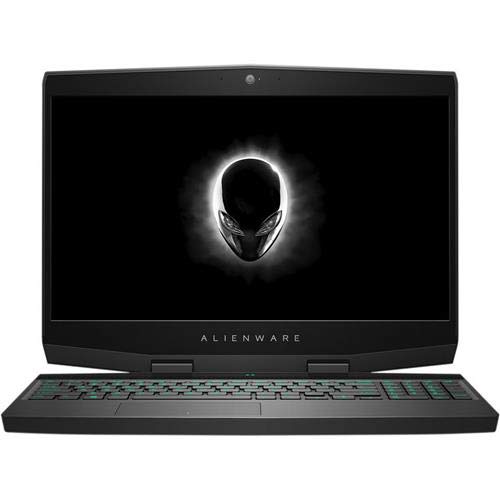
M15 15.6" Gaming Notebook - 1920 x 1080 - Core i7 i7-8750H - 16 GB RAM - 512 GB SSD - Epic Silver - Windows 10 Home 64-bit - NVIDIA GeForce RTX 2070 with 8 GB - in-Plane Switching (IPS)
  • Brand: Alienware
  • Model: wnorn5chm152h
  • Screen: 15.6 Inches Inches
  • Processor: Intel
  • GPU: NVIDIA GeForce RTX 2070 Max-Q
  • RAM: 16 GB
  • Storage: 512 GB SSD
Recent Reviews
Bob
3.0 out of 5 stars Nice gaming laptop, but with a few issues

Didn't think I would ever spend the extra money for an Alienware laptop, but Dell had an awesome deal offered back in March, so I dove in without reading reviews.The good:The design is sleek! Keyboard is comfortable (for a laptop) and I was surprised they fit in the numeric keypad as well. The RGB lighting is a nice touch, although many modern gaming laptops will have this feature. Overall the laptop has a nice, solid feel to it.Performance is really good, which I expected for the money! Plays games at a high FPS even without tweaking out of the box. I likely won't try to overclock it until it starts showing its age.The downsides:The touchpad is... well... touchy. Seems to require more force to 'click' than most laptops I have used. I'm just double tapping now instead which is a reasonable work around for me.Sleep Mode: This laptop seems to like to wake up from sleep mode all on its own. I have updated drivers multiple times, disconnected external devices, quadruple checked all my power and sleep settings. It's frustrating to leave a laptop at full charge, closed and asleep for a day, only to find it dead the next day. I have not wanted to deal with phone support so I'm just in the habit of shutting down when I'm done for the day.Screen: I'm a little disappointed that the screen resolution is only 1920x1080. It's perfectly usable and the image is great, just expected a higher res screen for the money.Sound: the built in speakers... well... suck! I'm actually very disappointed in them. I suppose it gets the job done but really if I want to do any gaming, I'll have to wear headphones. My last non-gaming laptop had better sound. Speaking of sound, the fan is noisier than I expected. Most of the time it runs quiet, but as soon as you fire up a game or start to stress the system, it's somewhat distracting. If you have sound turned up or have headphones it won't matter. Just a bit disappointing given it's new. I expected quieter.Battery: This is the worst part of the laptop. Battery life sucks! I have only had the laptop about 6 months, and it seems like I only get a little over an hour use on battery. I've turned down screen brightness, set other power saving modes, and disable everything I reasonably can without completely crippling it to the point I can't use it. I mean, come on, generally I need WiFi still to play games or surf the Internet. Most modern games require an Internet connection. I read an article that suggests I should be able to get two hours, but they put the brightness to levels you can hardly see during the day, and turn off Wireless. I have the 60Wh battery and I understand there is a 90Wh option. I may look into buying the larger battery when this one starts to show its age. That said, it is a gaming laptop and I figured it would not last as long. But come on, an hour? Don't expect to use this much without power or while traveling.Not sure I'd recommend this, at least not for the price. If you're really set on having an Alienware laptop, go for it! Had it not been for the deal Dell offered at the time, I likely was going to get an ASUS ROG, or a TUF. A couple friends bought the TUF model and for the money they really perform well!

Rowdy (Verified Purchase)
5.0 out of 5 stars Alienware

The battery life is a little low and the touchpad doesn't work with an external mouse attached but everything else is awesome.