1 of selected
Back to All Laptops

Customer Reviews

4.7
Based on 19 reviews
Wilson Score: 74.4
5 ★
66%
4 ★
23%
3 ★
7%
2 ★
2%
1 ★
2%

Recent Reviews

Verified Purchase
2/1/2026
5.0 out of 5 stars Perfect for an Architect or an ambitious designer
By Rod
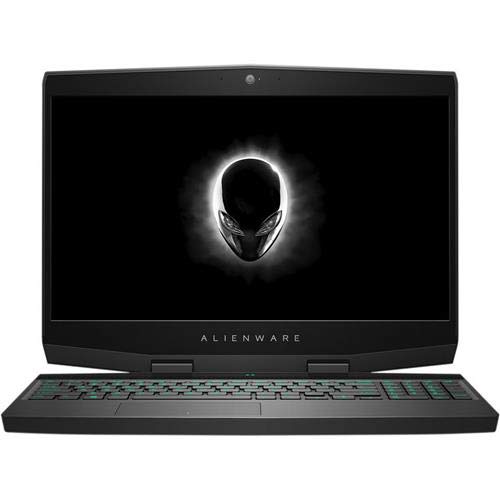
Purchased this on behalf of my brother he loves its performance. He's an architect and needed it for his designs and high quality rendering. It's been in use for over a month now and I've only heard positive feedback. Easy to setup. Battery life is about what you'd expect for a gaming laptop. But it definitely feels like it's built to last. As for me, they had me at the keyboard, which is like your own private light show. I definitely would recommend this nice piece of equipment with high performance that definitely gets the job done when it comes to graphics designing and is robust enough to withstand the toll of frequent gaming.
3 people found this helpful
Verified Purchase
2/18/2026
4.0 out of 5 stars Good laptop, extremely bad OS and minor trackpad challenges
By Jan
There is lots to love about this laptop with mostly only a few minor gripes.The good:1. The display is great. Bright enough, good colors, not too shiny and reflective.2. Battery life while in power saving mode is decent.3. FPS in games thanks to the Nvidia GPU are pretty good.4. During gaming, the laptop doesn't run too hot like my old Razer laptop that was scalding to the touch and required an external keyboard and mouse during gaming sessions.The cons:1. Not a fan of the e-shutter on the webcam. A physical shutter is always preferable.2. Super minor gripe: no sd card reader, but it makes sense because it's a gaming laptop.3. Windows 11 is a steaming pile and likes to put every app into eco mode which makes every app non responsive. I had to install Process Lasso (which is awesome, btw) to override Windows 11's eco mode power settings. This is really a complaint against Microsoft and their inability to create a good operating system and not Lenovo or this fine laptop.4. The trackpad buttons + trackpad location is annoying AF. I always need to have my hand slightly more to the left on the trackpad because the left click and right click buttons are not two separate buttons. Furthermore, if my trackpad hand (which is a thing) is not slightly more to the left, then I will not click the correct button on the trackpad. So when I want to left click, I will instead right click. The poor location of the trackpad and lack of individual buttons is extremely frustrating, but I am slowly retraining myself and my desire to throw this laptop out the window from time to time is starting to decline. Yay.5. The description for the model I purchased said the laptop has 1tb of storage - which is true, but unfortunately, in reality that meant two 512tb SSDs rather than a single a 1tb SSD. I ended up taking out one of the 512tb SSDs (which is actually pretty easy to do) and replacing it with a way overpriced 2tb SSD (big shout out to all those AI companies for jacking up the prices of RAM and SSDs).Long story short: an altogether good gaming laptop with some trackpad location and button usability issues. Knowing what I know now about this laptop, I would still purchase it.
3 people found this helpful

Frequently Asked Questions

What is the specific model of the AMD Ryzen processor and its performance specs?
This laptop uses an AMD Ryzen 7 260 processor with 8 cores and 16 threads. It has a base clock speed of 3.8 GHz and can boost up to 5.1 GHz, with 8MB of L2 and 16MB of L3 cache.
Can you detail the exact specifications of the 15.1-inch display?
The display is a 15.1-inch WQXGA (2560x1600) OLED panel. It features a 165Hz refresh rate, HDR True Black 600 certification, 500 nits of brightness, and covers 100% of the DCI-P3 color gamut. It is a glossy screen with low blue light emission.
What are the full connectivity and port options on this Legion 5?
It includes: 3x USB-A 5Gbps ports (one is Always On), 1x USB-C 10Gbps with Power Delivery (65-100W) and DisplayPort 2.1, 1x USB4 40Gbps port with DisplayPort 1.4, 1x HDMI 2.1 port (supporting up to 8K@60Hz), a 3.5mm headphone/mic combo jack, an Ethernet (RJ-45) port, and a power connector. It also has Wi-Fi 7 and Bluetooth 5.4.
How much dedicated video memory does the NVIDIA RTX 5060 graphics card have?
The NVIDIA GeForce RTX 5060 Laptop GPU in this configuration has 8 GB of dedicated GDDR7 video memory.
What is the physical size and weight of this laptop?
The laptop measures 13.58 x 10.05 x 0.85 inches and weighs 4.1 pounds.

Similar Laptops You Might Like

$1499.99
1 reviews
2025 Laptop, Laptop Computer with Intel Twin Lake N150 Processor(Up to 3.6GHz), 16GB DDR4 512GB SSD Windows 11 Laptop, 15.6" IPS 1080P, USB3.2, Long Battery Life
  • Brand: ACEMAGIC
  • Model: TX15
  • Screen: 15.6 Inches Inches
  • Processor: Intel
  • GPU: Intel UHD Graphics Up to 1.2GHz
  • RAM: 16 GB
  • Storage: 2 TB
Recent Reviews
Lori Middleton
5.0 out of 5 stars Stunning Display

The 16-inch IPS screen delivers vibrant colors and sharp details, enhancing the gaming and viewing experience significantly.
$1449.99
129 reviews
acer Nitro V 16S AI Gaming Laptop | AMD Ryzen 7 260 Processor | NVIDIA GeForce RTX 5060 Laptop GPU (572 AI Tops) | 16" WUXGA IPS 180Hz Display | 32GB DDR5 | 1TB Gen 4 SSD | Wi-Fi 6 | ANV16S-41-R2AJ
  • Brand: Acer
  • Model: ANV16S-41-R2AJ
  • Screen: 16" Inches
  • Processor:
  • GPU: NVIDIA GeForce RTX 5060
  • RAM: 32 GB
  • Storage: 1 TB
Recent Reviews
Severian (Verified Purchase)
5.0 out of 5 stars Best Mid Price Gaming PC Option in Summer 2025

Pros:* Fast, cool, and quiet. After hours of gaming with Stalker 2, Cyberpunk 2077, and BG3, max temp hit by the CPU was only 79 degrees C, and that only for a very brief time. My old ASUS Tuf would be at least ten degrees hotter after such a test. Also of note, at the end of that test, the fans do not sound like Blackhawk helicopters under military power, an annoying characteristic that both my older Asus and older HP Omen had. Test was done "vanilla" with no external cooler fans, repasting, etc.* Nicely configured hardware. The 5060, Ryzen 7, and WD SSD drive all work well together.* WD SSE drive, very high quality, reads at 6300 mbps.* Second SSE slot is open.* Caser very easy to open, well organized.* Good build quality. The Acer feels very solid and can be opened with one hand. The unit has no "flex".* Good gaming performance. Cyberpunk 2077 at 2K / high detail can hit 65 fps with ray tracing on and can reach well over 100 FPS with ray tracing off.* Reasonable price and good component value. Costs $100 more than similarly configured laptops selling with 4050 GPUs, 16 GB RAM, and 512 GB HDs, machines much worse in all ways.Neutral:* FHD screen, fast but dim. Typical of midrange laptops. I suggest using an external monitor anyway, but if you plan on playing all the time off the laptop, you may want a better screen option, which will likely cost a lot more.* Port selection is adequate. 3 3.2 USB As, 1 USB 4.0 C, 1 HDMI, SD card reader, headphone jack. Decent, but a Thunderbolt port and / or additional C port would be welcome.Cons:* Front of lid seems to be easily smudged and seems a fingerprint magnet.* Usual annoying bloatware that needs deletion, including world's worst AV software (McFluffy).* Need to set up / sign into MS to launch the operating system. Owners should have the option to bypass this annoying step.* Documentation is close to non-existent, both in terms of what's in the box and what's online.* 32GB RAM comes as two 16 GB chips, so upgrading to 64 GB means having to buy two new chips instead of one. Every PC maker seems to do this, which does not make it any less annoying. Give me one 32 GB chip, charge me $20 more.Note: Make sure to purchase directly from Amazon. Third party sellers often void mfgr warranties by adding components themselves and some will ship returned machines as new. Amazon is the only PC seller I'd buy from on their site.Bottom Line: Well balanced, well made, and reasonably priced for high value components.

Michael (Verified Purchase)
4.0 out of 5 stars Great, powerful laptop but compromises for gamers

This Acer Nitro V 16S AI laptop is a good laptop. For current prices being as expensive as they are, I think this laptop hits a sweet spot for someone that needs just the right amount of additional horsepower that most other AI "CoPilot+" laptops don't offer. This is a large laptop. While not as large as some 18" laptops, this one certainly has a wide footprint. This is good for my needs to have a larger screen for coding than my old 15.6" laptop. I do enjoy how even with this footprint, they kept the "lid-closed" top to bottom height a nice slim measurement which means you can carry this under your arm or clasped in your hand and it doesn't feel like a 3-inch slab of concrete. I like that the top lid is metal (just the top-side of the lid) and the rest of the laptop being plastic ensures it is not anymore heavy. I think this laptop has a good balance of weight overall. It doesn't want to tip backwards automatically with the lid open or anything of that sort. Proprietary charger is a little bit of a nuisance but all gaming laptops in general just haven't gotten to a reliable point yet of being universally USB-C charge compatible anyway. It's an industry-wide issue so no big deal. I enjoy the keyboard on this laptop a lot. It is very nice to type on. If you have large arms and hands, I think the placement of the touchpad may be awkward for you because it is offset to the left and your left hand may brush the touchpad while typing. For most people, not really an issue. Now, if you are planning on having a portable laptop to keep directly on your lap specifically for hardcore gaming, then do not purchase this laptop for that use case. Your needs would be best served by an older-gen less powerful laptop like an RTX 2000 or 3000 series which will have much better cooling that you could potentially run games while it rests on your legs, but for this 16S AI laptop you want to be gaming on a solid surface instead of on your person. At stock settings, the laptop does run very hot and its fans are loud even when doing pretty minimal work *UNLESS* you lower the maximum processor utilization and ensure the CPU is not going into Turbo. I did this in Windows Control Panel and set Windows power mode to "most efficient" and enabled ECO mode in the pre-installed Acer NitroSense software which I set to be automatically enabled whenever it's on battery and not plugged into a charger. Now I have *ZERO* fan noise or heat even when doing some fairly intensive work with AI LLMs while simultaneously coding with VS Code and using a web browser. And the laptop is still very fast and responsive even with these settings changes due to the new-gen hardware it has. This Ryzen 7 CPU is very efficient while being powerful and 32GB of DDR5 RAM keeps things running smoothly. Maybe even undervolting the CPU and GPU if you can find a way would be worth it if you want to try to run ice-cold but not necessary. Even though this laptop has a smaller capacity 75wH battery than my old laptop which had a 96wH battery, I find that this laptop can outlast my old laptop due to its efficiency and with all the power saving settings I enabled. I choose to charge this thing to 80% max to keep the battery healthy (NitroSense has a setting you can enable for this) and even at that percentage it will last well over 6-7 hours. Which is plenty time for me to sit and do the work I need and then eventually connect to a charger. When I am plugged into a charger, this laptop gives me an 8GB 5060 RTX GPU to use for smooth 1080p gaming if I ever have a need to, which is awesome. Overall, this laptop is serving my needs perfectly and I am happy with it.