1 of selected
Back to All Laptops

Customer Reviews

4.3
Based on 220 reviews
Wilson Score: 80.8
5 ★
66%
4 ★
23%
3 ★
7%
2 ★
2%
1 ★
2%

Recent Reviews

Verified Purchase
8/30/2024
5.0 out of 5 stars I needed to play around to get used to the Chrome universe
By Know-it-all
I'm experiencing a learning curve from handing in my old Dell laptop (retirement) to getting used to this new machine. Some things are great - no more long wait times for the laptop to boot up, for example. I also like the customization of the dock (although my laptop also was nicely customized), showing me the most often used apps I need access to. However, I HATE not having lit keys on the keyboard. This one is totally on me, as I thought that I had narrowed my wish list down to devices with a lit keyboard.Since the Lenovo has limited storage (though mine does have 64GB of local storage), I purged my old files from my Dell onto a portable hard drive and moved my important daily-need files into two clouds: pCloud (2 TB) and a personal free OneDrive cloud. The latter is extremely helpful if you wish to edit your existent Windows docs and Excel sheets as you will still be able to do that in the cloud. If you open these MS files inside a Chromebook, they will either be non-editable or be converted to Google docs and sheets (as per your setting). The file explorer can be linked directly to your clouds (most of the common ones, at least), so that you can download items onto the Lenovo, then pull them over into the cloud storage folders you specify. That's a really helpful feature.Transitioning from Windows Outlook onto Google calendar was hard. :( The Lenovo allows the Google Calendar icon to appear on the dock, which is very helpful; nevertheless you might have a hard time getting used to the new "universe" if you're not Google-familiar.I played around with this machine while it wasn't plugged in and it lasted forever. That is really nice. Plus it doesn't run HOT like my old Dell did!I like the built-in calculator, which makes this a larger device, not something that is easily toted around. I miss the ability to lock the calculator to prevent accidental inputs. The Lenovo's calculator is just a web app that you can pin to the dock. The actual calculations seem to be running online rather than on your device (hence no lock).The sound is accessed by clicking on the time icon on the lower right. It took me a while to figure out as the two sound icons on top of the keyboard didn't seem to be functional. I initially took off a point for the lack of sound control via keyboard. But in the meantime, I found the manual for this machine and learned that the launcher icon (the white circle between the "tab" and the "shift" keys) must be pressed for any of the function keys to work. The launcher by itself shows you the available apps, files, and images. It will also show you a page with the keyboard short cuts.If you like quick access to Google apps (Maps, YouTube, Photos, Keep) and other apps (Netflix, Prime Video, your password manager), you can pin them directly to the dock and they will either open in full-screen mode or within your browser. You can pin quite a few. I have 12 apps pinned right now, but there is room for more.You can also pin your favorite files to the right of the dock for quick access. In addition, if you have an android phone, messages will flash quickly on the right part of the dock. This is great for two-factor authentication, as you don't even need your phone nearby.So all around, there is stuff to learn if you're new to a Chromebook, but this Lenovo has you covered.
43 people found this helpful
Verified Purchase
6/2/2025
4.0 out of 5 stars Was great .. until it randomly stopped powering on
By Laniesha Love
I waited 3 months before writing this review. I love my laptop! I walk around the house like "you better not be touching my laptop" all day lmao.Ive had two minor issues to note- 1: my onscreen keyboard does not work when in tablet mode without it being updated. Easy fix.. keep it updated lol2- Sometimes my streaming apps close/act wonky. That's upsetting and I have found no fix but I did do a little researching, finding that these are not streaming laptops and what not. Idk why it exactly does it, it just does. I’ll restart the app and 9/10 it works. Kinda my only real complaint! It’s light for the size, picture is good, vibrant, it’s not super quick but idek what I mean there cause it isnt slow lol all in all I love it! Its the best Chromebook Ive had outside of a MacBook so far.EDIT!! Okay so today is August 14th, 2 months after my review and my laptop no longer turns on!! I am pissed as my classes start tomorrow morning. Idk what happened as I always shut it down and even delete things I no longer need. I hoped it would last at least a year! 😒😒Stop selling refurbished stuff cause it says NEW when it clearly ISNT!WOW- Another review lol it winded up coming back on About 8 hours after this review??? but now I’m back because my kid jumped on my bed and shattered my screen. I may try to get it fixed but for all that I can get a new one. Came to check the price before I made the decision. Still love her! Get it!
15 people found this helpful

Frequently Asked Questions

What is the actual screen resolution of this Chromebook? The title says 1920x1080, but the specs list 1366x768.
The product details confirm the maximum screen resolution is 1920x1080 pixels (Full HD). The 'screen_resolution' field in the specs appears to contain an error, as it contradicts both the title and the 'max_screen_resolution' specification in the product details.
How many USB ports does this laptop have, and what types are they?
According to the product details, this laptop has three USB 3.0 ports. The bullet points specify it includes both USB-A and USB-C ports among these, along with a 3.5 mm audio jack.
Is the RAM soldered onto the motherboard, or can it be upgraded later?
The RAM is listed as 8 GB LPDDR4X. The 'LP' in LPDDR4X stands for Low Power and typically indicates the memory is soldered onto the motherboard, meaning it is not user-upgradeable after purchase.
What wireless networking standard does this IdeaPad Flex 3i support?
It supports the 802.11ax wireless standard, which is also known as Wi-Fi 6. This provides faster speeds and better performance in congested network areas compared to older standards like 802.11ac.
Does the webcam have a physical privacy shutter?
Yes, the description states the camera includes a physical privacy shutter that you can close for extra security when the camera is not in use.

Similar Laptops You Might Like

$359.99
30 reviews
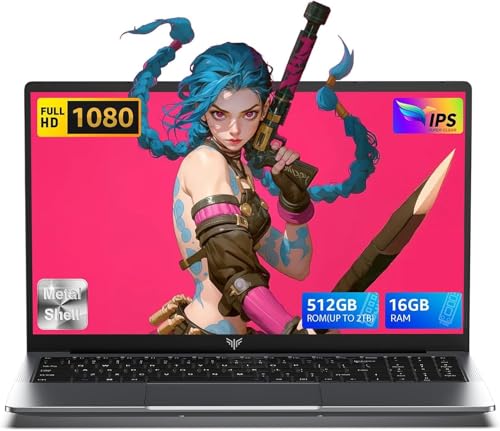
ACEMAGIC 2025 Laptop,15.6-Inch FHD Display Laptop with Quad Core-12th Alder Lake N95(Up to 3.4GHz), 16GB RAM 512GB ROM Traditional Laptop Computer,Silver
  • Brand: ACEMAGIC
  • Model: AX15
  • Screen: 15.6 Inches Inches
  • Processor: AMD
  • GPU: Integrated
  • RAM: 16 GB
  • Storage: 2 TB
Recent Reviews
Alaya (Verified Purchase)
5.0 out of 5 stars Huge screen and powerful

Wow, the screen size is huge. I have the smaller version of this laptop and this 17" version dwarfs that. The screen looks vibrant and robust and the speakers are loud and clear. The performance is also a lot faster with no lag. I really love the full sized keyboard, the layout feels comfortable to type on.

Empress Abiona (Verified Purchase)
5.0 out of 5 stars BUY IT

Amaaaaazinggly big interface, I LOVE this laptop. Works super fast, Perfect for work/ Making music/ Day to day tasks and hobbies. Amazing HD screen and audio . 10/10

$339.99
18 reviews
ACEMAGIC Laptop, 15.6" Business Student Laptop Computer, Intel Quad-Core Processor Windows 11 Laptop, 16GB DDR4 512GB SSD, Up to 2TB,180° Open Angle, Metal Shell, WiFi, USB3.2, Type C
  • Brand: ACEMAGIC
  • Model: AX15
  • Screen: 15.6 Inches Inches
  • Processor: 3.4 GHz Intel_Mobile_CPU
  • GPU: Integrated
  • RAM: 16 GB
  • Storage: 2 TB
Recent Reviews
David JB (Verified Purchase)
5.0 out of 5 stars 5 stars

great laptop for the price. The 16GB RAM and 512GB ssd provide smooth performance and the 180° hinge is a nice touch. Windows 11 runs well, and the sleek Silver Gray design looks premium. Highly recommend!

3whitey (Verified Purchase)
1.0 out of 5 stars Crashed

Laptop crashed with only a few days of use.I don’t find any warranty information