1 of selected
Back to All Laptops

Customer Reviews

4.4
Based on 861 reviews
Wilson Score: 85.7
5 ★
66%
4 ★
23%
3 ★
7%
2 ★
2%
1 ★
2%

Recent Reviews

Verified Purchase
6/18/2021
4.0 out of 5 stars Good for the price, but add another stick of RAM to unlock its true potential.
By Matt
Alright, this one doesn't seem to have an in-depth review so I'll give it a shot. Before we get started, be aware that the processor in this machine performs better with dual channel RAM (that means two sticks). This machine only ships with one 8GB stick. The general performance of the chip, ESPECIALLY when it comes to graphics, will be significantly enhanced by adding another stick. This is an easy upgrade even for a novice and I'll include some instructions at the end on how to do this. But first let's talk about the laptop.The Ryzen 5500u processor included here is plenty fast for whatever you want to do. It'll plow through your spreadsheets, web browsing, movie watching and much more. It can even play some games! But not all the games. It'll handle less demanding or older titles with ease and can even play some of the more demanding titles of today if you're willing to turn the settings down. But if you're really looking for a mobile gaming machine that can do all the latest games with effects turned up you'll need to spring for a $1000+ gaming laptop with a dedicated video card and a lot more disk space.The included 8GB of RAM is more than enough to handle everyday tasks like web surfing, office work and light photo/video editing, but as stated above you'll need to upgrade to 16GB if you want to get the most out of the machine or play games. As for the 256GB SSD, it should be enough for most users. Who even saves stuff to their actual computer these days anyhow? Unless you're putting a lot of games on there, in which case it'll fill up quickly.The screen is nice for this price range. It's an IPS display so viewing angles are great and it's plenty bright with sharp colors. No complaints here. Battery life is good but not great, certainly good enough for the price you're paying.The keyboard is a laptop keyboard. It's not great, but it'll do. I've typed this whole review with it and it's been comfortable enough. The speakers are laptop speakers. They suck. They're good enough to watch a youtube video but don't rely on these to watch a movie or play music. It's got bluetooth so just grab your favorite speaker and use that instead. Your ears will thank you.Build quality is merely average as is the case with most laptops in this price range. As they say in the world of laptops "Performance, build quality, price. Pick Two." and HP went for performance and price here. That's not to say the build quality is bad, but the all plastic casing just doesn't have the sturdy feel of a more expensive aluminum body machine. That being said, just about any laptop isn't going to survive a long fall, a misplaced foot or a soak in the tub. Why is your laptop on the floor? HOW DID IT GET IN THE BATHTUB!? Take better care of your stuff dude. So don't fret too much here. It's more than strong enough to handle commuting to work or school in a laptop bag.Overall this is a good laptop for the price and I would recommend it, but you should really put in that second stick of RAM I was telling you about. It's not that hard I promise. All you need is a tiny Phillips head screwdriver and a credit/gift card you don't mind getting a little beat up. Oh, and an 8GB DDR4 3200MHz LAPTOP RAM stick. Make sure it's a laptop stick and not a desktop stick. The desktop one won't fit.I used this stick and it works great:https://www.amazon.com/Crucial-DDR4-Laptop-Memory-CT8G4SFRA32A/dp/B08C4Z69LN/ref=sr_1_4?crid=5MM4PVV45REW&dchild=1&keywords=ddr4+laptop+ram+8gb&qid=1623993425&sprefix=ddr4+lap%2Caps%2C203&sr=8-4First, flip the laptop on its back. You see the rubber pads? Take them off. They aren't hard to pry up, but BE CAREFUL, they're easy to break if you go too fast. Slow and steady. Set them aside. Now you see the screws hidden underneath.Now take out all of the screws. Place them aside in a way that will let you remember where they go.Next, look behind the screen hinge and find the gap where the silver plastic meets the white plastic as shown in the very helpful pictures that I have so graciously provided for you. Stick your plastic card in there and pop up the plastic tabs all the way to the hinges.Now flip the machine over and look at the next picture. See the arrows? Take your plastic card and wedge it in the crack between the top plate and the side plate. Apply downward pressure until the tab releases and it pops down. From here you can slowly run the card along the entire edge of the laptop, releasing each plastic tab until the entire plate has been removed.Since you can see all the computers guts now you're not going to touch anything. You're going to google "how to install laptop ram" and watch a video because it's takes about ten seconds and it's pretty much impossible to mess up but you'll feel much more confident if you watch someone do it first.After that's done just pop the bottom plate into place, replace the screws and put the rubber pads back in place and turn the machine on. Congratulations! You're a computer surgeon now and your laptop has reached its ultimate form. You can tell this story at parties for years to come to impress members of the opposite sex. So go enjoy your upgraded computer. You earned it.
460 people found this helpful
Verified Purchase
11/16/2021
5.0 out of 5 stars Works fine with Linux
By Polybutylene Succinate
The wifi card works out of the box from linux kernel version 5.16 onwards. On older kernels, you won't have wifi during install, which since there's no ethernet port might sound like a pain, but you can just plug in a phone and use USB tethering to get internet that way. After installing, you'll need to set up the rtw89 driver using dkms. (On Arch this is painless - just install rtw89-dkms-git. On other distros, the process may be a little more manual, but is well-documented.) I can't blame HP or the seller for this; the problem is Realtek for failing to get their driver upstreamed in a timely manner, as usual from Realtek. But I stress this problem will be solved in the near future with newer kernels.Suspend works from kernel 5.14. Earlier kernels I tested wouldn't enter suspend, they'd just sit at a black screen without turning off. So make sure you're using a recent kernel and you'll be fine.The biggest pain point is the SSD. Some models of this laptop are sold with a Kioxia disk drive that won't wake up from suspend. Meaning after suspend the drive disappears. If you run into this (hardware?) bug, you can append iommu=soft to your kernel parameters to fix it. The problem may also possibly disappear in a future kernel version by itself.The only remaining problems are the led built into the mute key, which is supposed to light up when the sound is muted. Personally, I'm glad this is broken and just stays off because it would annoy me if it worked. The blame for this goes squarely to HP; they only had to add literally two lines of code to the linux driver, and they couldn't be bothered. Also the touchpad randomly freezes on about 1/3 of boots, but that's a known linux bug with simple workarounds and a fix already written.Other than that it runs linux like a charm. All other features work, including UEFI functionality. It's lightweight, completely silent under light workload, and the Ryzen 5500U is a bargain. My only criticism is the keyboard and chassis are a wee bit too flexible for my liking.
7 people found this helpful

Frequently Asked Questions

What is the exact processor model and speed in this laptop?
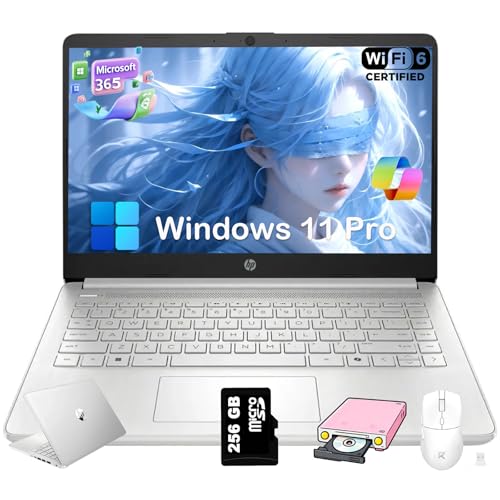
This laptop uses an Intel Processor N150, a quad-core CPU with a base speed of 1.1 GHz that can reach up to 3.4 GHz.
How is the 384GB storage advertised in the title actually configured?
The total storage is a combination of 128GB of internal UFS storage and a separate, included 256GB SD card, which is inserted into the laptop's SD card reader.
What is the screen resolution and type?
It has a 14-inch HD (1366 x 768) anti-glare LED display with a brightness of 250 nits. It is not a touchscreen.
Does this laptop come with Microsoft Office, and for how long?
Yes, it includes a one-year subscription to Microsoft 365, which provides access to applications like Word, Excel, and PowerPoint.
What are the battery life and charging capabilities?
The battery lasts up to 11 hours, and HP Fast Charge technology can bring the battery from 0% to 50% in approximately 45 minutes.

Similar Laptops You Might Like

$399.99
17 reviews
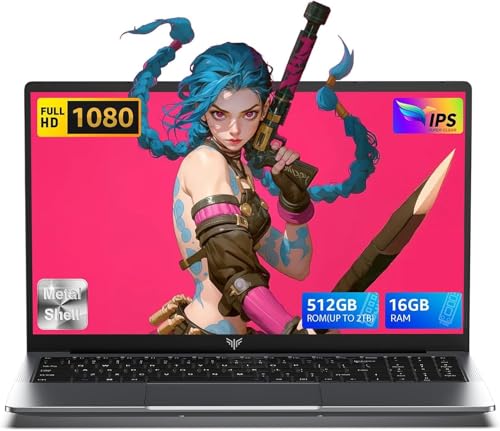
Laptop, 15.6" Business Student Laptop Computer, Intel Quad-Core Processor Windows 11 Laptop, 16GB DDR4 512GB SSD, Up to 2TB,180° Open Angle, Metal Shell, WiFi, USB3.2, Type C
  • Brand: ACEMAGIC
  • Model: AX15
  • Screen: 15.6 Inches Inches
  • Processor: Intel
  • GPU: Intel UHD Graphics Up to 1.2GHz
  • RAM: DDR4
  • Storage: 512 GB SSD
Recent Reviews
David JB (Verified Purchase)
5.0 out of 5 stars 5 stars

great laptop for the price. The 16GB RAM and 512GB ssd provide smooth performance and the 180° hinge is a nice touch. Windows 11 runs well, and the sleek Silver Gray design looks premium. Highly recommend!

3whitey (Verified Purchase)
1.0 out of 5 stars Crashed

Laptop crashed with only a few days of use.I don’t find any warranty information

$249.99
15 reviews
2025 LX15 Laptop, 15.6-inch FHD (1920 x 1080) Display, Ιntel N197(4C/4T) Processor, 8GB DDR4 RAM, 256GB SSD, WiFi5, BT5.0, 38Wh Battery, Gray
  • Brand: ACEMAGIC
  • Model: LX15
  • Screen: 15.6 Inches Inches
  • Processor: Ιntel
  • GPU: Integrated
  • RAM: DDR4
  • Storage: 256 GB SSD
Recent Reviews
Nicholas (Verified Purchase)
5.0 out of 5 stars Rocky setup, but end result was worth it

The media could not be loaded. When I first booted this laptop up, it presented me with a "defaultuser0" account that I didn't know the password to. I completely wiped this laptop's SSD and reinstalled Windows to play it safe, and after that it worked like a charm with regular setup. I did have to find drivers online for the touchpad afterward though.Getting at the SSD to do all of this was thankfully pretty easy, since the bottom panel was removable with a few tiny screws. I noticed that there is only a single slot for RAM in there, but it isn't soldered on so I was able to upgrade it with a 16 gig stick at least. The N97 is no gaming powerhouse but it plays some older titles still, and the laptop works great for work like emails and browsing the internet.

Romaine (Verified Purchase)
4.0 out of 5 stars Good Stuff

Its good runs fast and has space, works for school