1 of selected
Back to All Laptops

Customer Reviews

4.2
Based on 1,700 reviews
Wilson Score: 82.2
5 ★
66%
4 ★
23%
3 ★
7%
2 ★
2%
1 ★
2%

Recent Reviews

Verified Purchase
11/1/2015
5.0 out of 5 stars Hardware is Linux-supported!
By Kris
It runs Linux! More on that later in the review!UPDATE 2: Added pics of the screen light bleed and of the display in bright sunlight compared with my Toshiba Chromebook 2's glossy IPS display. Note that while the Chromebook's display looks pretty hard to read in the picture, it was easily usable in that lighting condition and I had no trouble seeing what I was doing on it as I sat in that exact spot and browsed the web for an hour or so. The Inspiron's display, however, looks even better than the Chromebook's in the pictures, and looked fantastic in real life. The matte finish really helped glare, and the screen was plenty bright enough to read everything perfectly.UPDATE: I put TF2 on my linux install, and it plays goregously at maxed settings native resolution. This is the game I play most often so the fact that this laptop maxes it out handily reinforces my very good impression of the hardware. Again, temps stayed below 75 CPU and below 70 GPU. Fan noise was definitely audible, but fairly reasonable and quiet.SHORT REVIEW:Build Quality: 7/10Performance: 9/10Screen: 8/10Keyboard/Trackpad: 8/10Connectivity: 9/10 (no VGA)Maintainability: 10/10These specs for this price are a no brainer assuming nothing else big is wrong, and I haven't found a problem yet (in Windows, Linux has had a couple issues). Plays modern games on high settings 60fps and will do so for a couple more years. I really love it so far, and I should have pics of the only issue I've found, a small light bleed on the bottom of the screen when the entire screen is black. Overall, I highly recommend.LONG REVIEW:I just got this laptop today. Build quality is good, but unimpressive. The laptop feels quite solid and does not flex when force is applied to anywhere on the chassis or keyboard. It is plastic, but feels rather nice and does not appear to retain smudges. With the Windows setup out of the way, the laptop is already very snappy. Programs execute extremely fast between the 45W i5 and the SSD Windows is installed on. I ran a few browser benchmarks preliminarily for fun in Chrome. Sunspider1.0.2 gave a score of 205 ms, BrowserMark returned 3700, and Octane 29000.Not only is the SSD that comes with the laptop quite fast (Windows boots in approximately 15 seconds from the time you press the power button), it has an easily accessible 2.5" SATA bay (lacking screws to secure the drives, sadly) open for another drive. A hatch secured with 1 screw covers about 7/8ths of the laptop's bottom, so accessibility for drive swaps and RAM upgrades and cooling system maintenance will be excellent. I installed a Samsung Series 840 SSD in the 2.5" bay and it worked immediately. The keyboard and trackpad are good in my opinion, but I am not a connoisseur of such things. The screen is big, bright and sharp. I can't say how it fares in sun yet because today has been rather cloudy, but I'll update my review with that information, as well as usage info and potentially pictures, once I've had the laptop for longer. Speakers are good for a laptop, they sound ok. The touchpad is responsive and relatively accurate. It's good, but it's no MacBook touchpad. The keyboard backlight is quite nice, pleasantly bright.Heat and noise are only a bit more noticeable on this than my fanless chromebook, a 2014 Toshiba Chromebook 2. Even when under load in Windows playing Viscera Cleanup Detail Shadow Warrior on nearly maxed settings, the device was relatively quiet, and temps stayed under 75 for CPU and under 70 GPU. I did not feel heat then because it was on the table, but now writing this review the laptop has a 58 degree CPU temp and the laptop feels slightly warm in my lap but in no way uncomfortable. The system is pretty big in length and width, barely fitting in my backpack, but despite this it is pretty thin, about the same as my chromebook in a hard plastic shell case. I don't think the laptop is heavy in particular, but I am a poor judge of weight. Wireless signal has been strong and consistent since I first entered the password, so I have great faith in the wireless chip in this unit. I will update with Ethernet connection quality when I've tested it. USB connections are very fast, as I found when making my Linux bootable to install my dual boot.My luck with Linux has been good! This is a crucial section of the review because Linux functionality is very important to me, so I took a big risk in preordering this unit in terms of potential device issues that would force me to use Windows exclusively. I burned an Ubuntu MATE 15.10 iso in windows 10 using the Pendrivelinux universal USB installer tool onto my flash drive, and when tested on my desktop the live USB worked flawlessly. On my laptop, I inserted the USB into my right USB port (this is likely of no significance, only stated for reference), rebooted and pressed f12 repeatedly before the Dell logo pops up and when the Dell logo appears, a small box will be in the bottom of the screen with words about " F12 = BootMenu" and was brought to the menu for UEFI secure boot options. One of them was my USB drive, so I booted it. I got to a GRUB menu that let me select "Try ubuntu without installing" and "Install ubuntu", among other options. I tried both of these, and the computer would get to the Ubuntu MATE splash screen and then freeze. I fixed this by pressing "e" over the "Try ubuntu without installing" option and adding "nomodeset" to the boot arguments right after "splash" and finally pressing f10. This allowed me to boot to the Ubuntu desktop and use the install client. Install went without a hitch, everything downloaded and installed very quickly, and web browsing system performance over the live USB was very snappy and responsive despite the install loads in the background. I partitioned the SSD I inserted, which mounted as "sdb", into 20gb ext4 to mount as "/" and 90gb ext4 to mount as "/home", then the rest as a swap partition. Install was a breeze, but when I rebooted and selected Ubuntu in the GRUB boot loader menu, I had similar video issues as the splash screen issue from the live USB. I fixed this the same way but without accessing the UEFI boot menu: by rebooting the laptop and waiting for the GRUB boot loader to appear, hovering over "Ubuntu", and adding "nomodeset" again after "splash" in the text that appeared and once again pressing f10. I got a login screen! First things first, install the NVIDIA drivers you need to make this annoying boot argument unnecessary and allow your laptop to function and boot normally. "sudo apt-get install nvidia-352" in terminal, enter your password, and follow instructions, if any appear. After this, reboot normally and verify that the driver being used by the system is the proprietary NVIDIA 352 driver and not the opensource Nouveau driver. If you encounter display problems one last time on this reboot, again press "e" over Ubuntu and append "nomodeset" to your boot arguments and you'll be fine. If on reboot the system is using a driver other than the proprietary NVIDIA 352 driver, change it to that. You now have a fully functioning Linux system! The only really noticeable bug is an occasional freeze on wakeup from sleep when you close the laptop, which is supposedly related to the Intel integrated graphics driver I believe and likely will be fixed. Otherwise, the laptop has been great. In practice the battery lasts about 6 hours of web browsing with high display brightness. Not great, but at least decent for a gaming laptop. Windows appears to do markedly better than Linux for battery life, sadly.
63 people found this helpful
Verified Purchase
1/19/2016
5.0 out of 5 stars Perfect for the cost! A 960m + a SSD is the BEST choice for this price range.
By Edison
I still can't believe I found something this decent as a laptop, for this price. I'm honestly shocked. I've built 4 desktop computers, so I'm not about to say that this will play games at an amazing settings/frames per second. However, this computer is certainly better than most things you will find at this price range.The key features that I need for a computer before it's worth it is:-Best Graphics card for the price-At least 8gb of RAM (more doesn't really matter. 8gb is a very good spot)-SSD (120gb is good, more is fantastic!)-Quad Core-Runs Windows (for programs and games)[This laptop has all of this.]The graphics card for this is a 960m. It's average 3d benchmark is almost 1700 (all posted Benchmarks can be found on the same website if you google it), which isn't all that wonderful when you compare it to a GTX 980 (which in comparison, has the average benchmark somewhere around 9700). This is a micro graphics card, because you just can't install a full-size graphics card into a laptop for a number of reasons. If you want the best graphics, build your own PC. However, this is certainly better than Integrated Graphics (Intel HD 5000 has the average 3d benchmark around 600 - NEVER buy something with Integrated Graphics if you want to play video games).Let's get realistic, a 970m is going to be much better (average 3d benchmarks around 4200), but wasn't worth the extra money spent for me. A 950m isn't going to be as good (average 3d benchmarks around 1400) as the 960m, but I have seen a lot of laptops offer the 950m for this same price range. Overall, if you are buying laptop for gaming you need to understand this. The 960m, which this laptop has, is a great deal. Heck, looking at some of the other laptops on Amazon, I'm seeing people buy a laptop with a 960m for $1100+. To push this point even further, I'm seeing people buy laptops at $1000+ and they still have Integrated Graphics (which sucks!!!).In summary, don't be a sucker and buy a laptop with a 950m, 940m, ANY FORM OF INTEGRATED GRAPHICS (Intel HD 5000). This is a great machine, and it's super quick because of the SSD (I'm not exaggerating. Once you get a SSD, you will never go back to a Hard-Disk Drive). It may not be the very best on the market, but that's actually a good thing for a number of reasons.Think about it this way: Laptops don't have the longest life span. It's not like a desktop PC, where I can just install a new Graphics Card and re-use my old parts. As technology advances, we tend the previous "better versions" of the product become cheaper. Objectively, this laptop is nearly as good as the other $1200+ laptops minus the CPU (which doesn't really need to be the best. You won't ever feel the difference unless you are doing a lot of CPU intensive things) and GPU (which this GPU, or graphics card, is more than capable of running a lot of games at decent settings. The 970m alone is several times better than this but typically is NOT worth paying $300+ more for me). In 5-10 years when you have to upgrade your laptop, you will be glad that you didn't buy that you didn't waste a crap ton of money over a laptop that wasn't that objectively better. Realistically, in the next 5 years, Graphics Cards will be SEVERAL times better than this current generation. Wait, and save that money for something else.Final notes: The laptop has pretty good battery life, doesn't come with a whole lot of crap software, doesn't have a glossy case finish (I'm not a a fan of glossy), and has a pretty decent touch-pad. It looks pretty attractive if you like black/red, and it has another slot to add in more Storage. Overall, I'm super happy I purchased this. I have literally no complaints as of yet. It's no desktop, but it's a good laptop for the price.
8 people found this helpful

Frequently Asked Questions

What is the exact screen resolution and aspect ratio of this 16-inch display?
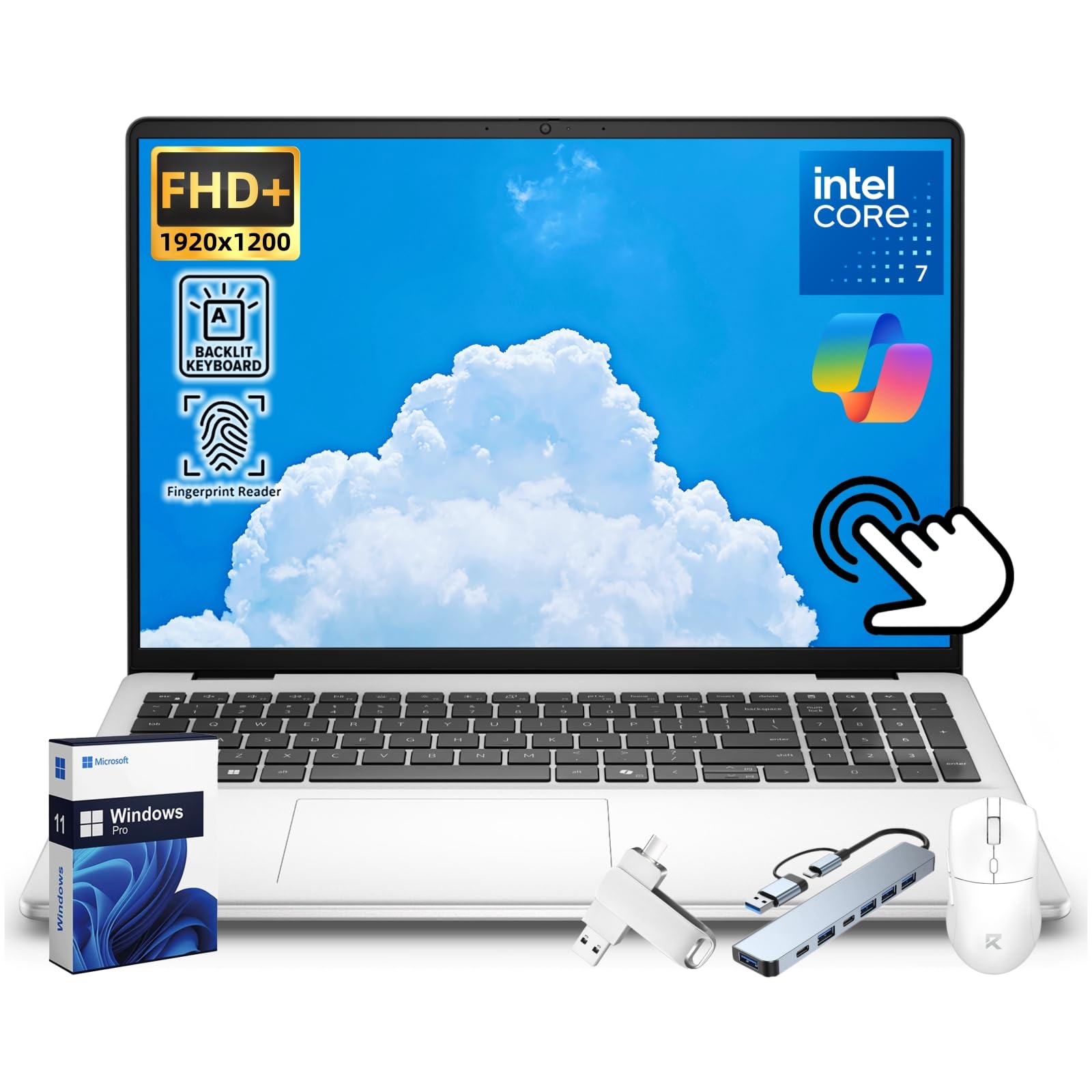
The display has a resolution of 1920 x 1200 pixels (FHD+) with a 16:10 aspect ratio, which is taller than standard 16:9 screens, providing more vertical space for documents and web pages.
How many and what type of USB ports does this laptop have?
It has three USB ports: two USB 3.2 Gen 1 Type-A ports and one faster USB 3.2 Gen 2 Type-C port that supports DisplayPort 1.4 and Power Delivery (10Gbps).
What does 'Original Seal is opened for upgrade ONLY' mean in the description?
It means the manufacturer's box was opened by the seller to install the specific upgrades listed (like the 32GB RAM and 2TB SSD) and to test the system. The laptop itself is new and configured to the advertised specifications.
What is the memory speed and capacity of the installed RAM?
The laptop is equipped with 32 GB of DDR5 RAM running at a speed of 5600 MHz.
Does this laptop have a dedicated graphics card for gaming or video editing?
No, it uses integrated Intel UHD Graphics. This is suitable for general productivity, business applications, and media playback, but not for demanding gaming or professional-grade video editing.

Similar Laptops You Might Like

$999.99
29 reviews
2025 Laptop,15.6-Inch FHD Display Laptop with Quad Core-12th Alder Lake N95(Up to 3.4GHz), 16GB RAM 512GB ROM Traditional Laptop Computer,Silver
  • Brand: ACEMAGIC
  • Model: AX15
  • Screen: 15.6 Inches Inches
  • Processor: AMD
  • GPU: Integrated
  • RAM: DDR4
  • Storage: 512 GB 512GB M.2 SATA SSD
Recent Reviews
Empress Abiona (Verified Purchase)
5.0 out of 5 stars BUY IT

Amaaaaazinggly big interface, I LOVE this laptop. Works super fast, Perfect for work/ Making music/ Day to day tasks and hobbies. Amazing HD screen and audio . 10/10

dawn (Verified Purchase)
5.0 out of 5 stars Great Purchase

I love my new laptop. It was so easy to set up. The 17-inch screen is wonderful, as well as the full keyboard. The mouse pad is nice and big, and the price was excellent. So glad I made this purchase.

$1499.99
1 reviews
2025 Laptop, Laptop Computer with Intel Twin Lake N150 Processor(Up to 3.6GHz), 16GB DDR4 512GB SSD Windows 11 Laptop, 15.6" IPS 1080P, USB3.2, Long Battery Life
  • Brand: ACEMAGIC
  • Model: TX15
  • Screen: 15.6 Inches Inches
  • Processor: Intel
  • GPU: Intel UHD Graphics Up to 1.2GHz
  • RAM: DDR4
  • Storage: 512 GB SSD
Recent Reviews
Lori Middleton
5.0 out of 5 stars Stunning Display

The 16-inch IPS screen delivers vibrant colors and sharp details, enhancing the gaming and viewing experience significantly.