
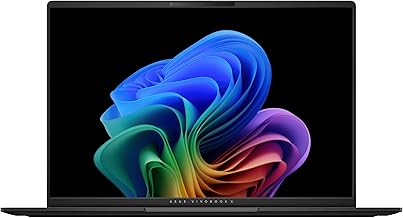
1 of selected
Back to All Laptops

Customer Reviews

4.6
Based on 60 reviews
Wilson Score: 82.4
5 ★
66%
4 ★
23%
3 ★
7%
2 ★
2%
1 ★
2%

Recent Reviews

Verified Purchase
8/7/2025
5.0 out of 5 stars Love my new 2025 ASUS Vivobook
By Marly J
I’ve now owned this laptop for over a month now and I can say that I absolutely love this machine. This 2025 Vivobook S 16 is a major upgrade from my 2020 Vivobook S 15 in every possible way.What I like:Screen – The switch from a 15.6” screen to a 16” 120hz OLED panel with a 16:10 aspect ratio is fantastic. Having a more vertical panel is great especially since more of what you’re viewing is able to fit on screen and is especially great when typing documents.Trackpad – The trackpad is considerably larger with an 80% increase and I love the size bump. At first, using my finger pads to scroll along felt kind of stiff but I had a suspicion that was due to the sticker that came covering the trackpad, so I used a baby wipe to wipe the trackpad and it’s been smooth to use since.Speakers – while these are still down firing speakers, they do have great sound. Obviously not the best but it gets loud and I had no trouble with hearing audio when watching YouTube videos of interviews, music videos, movie trailers etc. The previous reviewer who says the speakers aren’t great and has a coil whine sound most likely got a defective unit probably. No coil whine sound for me.Processor – This AMD Ryzen AI 7 350 processor is buttery smooth and responsive. I haven’t ran into any hiccups or slow downs when using the machine. It is also my very first AMD laptop. All my previous laptops were Intel. I recently encoded two videos to HEVC using Shutter Encoder and they both took less than 30 minutes total to complete whereas on my old laptop the process would take almost 2 hours.Without a doubt, this is a significant upgrade in processor power for me. I have not pushed this processor to it’s limits but for my use case, the experience has been perfect. The only area where there is some lag or choppy transitions, is the Windows File Explorer. No matter if you have the latest or most powerful device, the file explorer will still sometimes behave buggy which is a Windows problem.Other things I like about the machine is that it is very thin with a premium feel. I love the amount of ports it has in such a thin body and that machine charges via USB-C.What I don’t like:Keyboard – This is an RGB keyboard which is a first for me. The good thing is you can set it to a single colour. Key travel is nice and I do enjoy typing on this machine. I had to relearn how to type on a keyboard with a numpad again because I’d been using a keyboard without one prior. The only negative is probably the keyboard backlight. It could be a bit brighter, even at it’s highest setting.The only other negative thing I can say about this laptop is that you will find yourself cleaning it frequently because it easily attracts fingerprints and smudges. The black colour is very nice, however. All around, this is a fantastic device that falls in the mid-range category of laptops. If you do not have the money the more premium machines at more than $1500, then this could be the right choice for you.
9 people found this helpful
Verified Purchase
6/24/2025
5.0 out of 5 stars Amazing Laptop
By Cj Isom
Amazing laptop exceeded all my expectations. Sound quality is crazy good and speakers can blow you away. Super fast and ASUS face recognition is crazy fast. I can turn my laptop on and be inside windows in mere seconds. There’s no touch screen but I don’t mind that. Battery life honestly could be better it definitely isn’t 14 hrs..
5 people found this helpful

Frequently Asked Questions

What is the actual weight of this laptop?
The laptop weighs 3.31 lbs (1.5 kg), as stated in the description. The product details list the item weight as 5.59 pounds, which likely includes the packaging and power adapter.
What type of RAM is used, and is it upgradeable?
This configuration uses 16GB of LPDDR5 RAM. The 'LPDDR5' designation indicates it is low-power, soldered memory, which is not user-upgradeable after purchase.
How does the battery life of up to 14 hours apply to real-world use?
The 14-hour claim is based on a specific ASUS test (1080p video playback with Wi-Fi off, balanced power plan, and 150-nit brightness). Actual battery life will vary significantly with higher screen brightness, Wi-Fi use, and more demanding tasks like content creation or gaming.
What are the exact dimensions and screen properties?
The laptop measures 13.92" x 9.72" x 0.55" and has a 16-inch OLED display with a 3K resolution of 2880 x 1800 pixels, a 120Hz refresh rate, and a peak HDR brightness of 600 nits.
What specific AI features does the 'Copilot+ PC' and AMD Ryzen AI processor enable?
The AMD Ryzen AI 7 350 processor includes a dedicated XDNA NPU capable of 50 TOPS for on-device AI tasks. This, combined with the dedicated Copilot key and Windows 11, enables features like live background blur, automatic framing during video calls, and faster AI-assisted applications without relying on the cloud.

Similar Laptops You Might Like

$1099.99
221 reviews
acer Nitro V Gaming Laptop | Intel Core i7-13620H Processor | NVIDIA GeForce RTX 4050 Laptop GPU | 15.6" FHD IPS 165Hz Display | 16GB DDR5 | 1TB Gen 4 SSD | Wi-Fi 6 | Backlit KB | ANV15-52-76NK
  • Brand: Acer
  • Model: ANV15-52-76NK
  • Screen: 15.6" Inches
  • Processor: Intel Core i7-13620H
  • GPU: NVIDIA GeForce RTX 4050
  • RAM: 16 GB
  • Storage: 1 TB
Recent Reviews
S.B. (Verified Purchase)
5.0 out of 5 stars Runs my Sims perfectly!

This computer is amazing. Definitely worth it. This is the first real gaming laptop I’ve had and it makes a huge difference. Zero lag on my sims and I have almost all the add ons. I played the sims for like 3 hours straight and it barely got warm. Highly recommend!

Amazon Customer (Verified Purchase)
5.0 out of 5 stars Great gaming laptop

Excellent laptop. Runs much quieter and cooler then my Helios. Very fast. Works well for what I use it for mainly World of Warcraft but handles other games quite well. Very pleased with this purchase.
$799.99
239 reviews
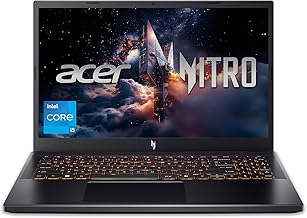
Nitro V Gaming Laptop | Intel Core i5-13420H Processor | NVIDIA GeForce RTX 4050 Laptop GPU | 15.6" FHD IPS 165Hz Display | 8GB DDR5 | 512GB Gen 4 SSD | Wi-Fi 6 | Backlit KB | ANV15-52-586Z
  • Brand: Acer
  • Model: Acer Predator Helios Neo 16
  • Screen: 15.6" Inches
  • Processor: intel core i5-13420h
  • GPU: rtx 4050
  • RAM: 8GB
  • Storage: 512GB SSD
Recent Reviews
Gabriel (Verified Purchase)
5.0 out of 5 stars It's good, but it could be better

I've been using this computer for a while now, it works very well, but there are times when it stutters, the FPS drops to 0, which usually takes less than 1 second, but it's still very annoying. The screen's 165Hz refresh rate is spectacular, but I did an online test and I'm almost certain it has ghosting, which is also quite annoying. Also it's a bit slow when performing various tasks, such as opening the browser or simply changing categories on Steam.I'm going to add more RAM since the 8GB it has doesn't seem enough to me; I even think that might be the root of the problem I mentioned. So, I'll try to upgrade to 32GB of RAM.But despite all of the above, it's still a very good computer. I like that it comes with the Nitro Sense application and also with Intel's graphics software, since it allows for some customization. The camera looks good and works smoothly in good lighting, but the computer doesn't have anything to cover the camera.You have 3 fan options: silent, balanced, and performance. Expect a lot of noise from the fan in performance mode. Also, another bad thing is that when I connected my headphones with a built-in microphone, the computer only recognized it as audio output, not as both audio input and output, so I had a lot of problems with that. I even had to restart my PC in safe mode to reset everything because I had no sound anymore, so be careful with that, If you experience the same issue, simply open the Realtek Audio Console application, then go to advanced device settings and program it as an input and output.So I think it's a very good computer. You have to do a couple of things beforehand to be ready to use it for gaming or anything like that, but I don't think I'll be changing it for a long time. Just add more RAM and you'll probably be good to go. I'll update this review when I add more RAM to let you know if there are any changes to the stuttering.So my final thoughts on this laptop are that I wish it were more of a turn-on, ready-to-use thing, but I guess you can't expect that at this price. Despite that, I give it 5 stars

Darsan (Verified Purchase)
5.0 out of 5 stars Best deal on a gaming laptop

Performance: This thing eases through all the games you practically throw at it UNLESS you want highest quality on the LATEST AAA game. You also get frame generation with the nice gpu inside there(4050).Quality, Speed, Brightness: The quality of a laptop at this price point is not something you find everyday, I also love the glossy look on the front panel. The brightness is really really high so no issues here. The speed , well you really need to upgrade this thing to 16gb for 100% usage. It’s absolutely worth it to do it yourself, you will feel incredible for the amount of money you save. Just buy another DDR5 8gb 5200MHZ and install it and you are set for everything really.Issues: Not so much of big issues, just new computer stuff like Driver issues where a usb might bug or something similar. Just update the laptop as soon as you get it.Battery: battery on a gaming laptop has never been good so always carry your charger.All in all, good investment for your gaming hobbies. Just install your ram and carry your charger when moving.