1 of selected
Back to All Laptops

Customer Reviews

4
Based on 49 reviews
Wilson Score: 66.8
5 ★
66%
4 ★
23%
3 ★
7%
2 ★
2%
1 ★
2%

Recent Reviews

3/1/2020
4.0 out of 5 stars I Highly Recommend This Alienware Gaming Laptop...but with a Few Caveats
By Michael Gates
Now that I've had this bad boy for a few days and have finally gotten it working properly and set up the way I want it, I must say that I'm very impressed and quite satisfied overall. While the laptop is relatively thin and lightweight, it is still very fast and quite powerful, and I have no doubt that I'll be using it extensively over the next few years and that it will help me to be quite productive. To be fair, I should point out that, even though this is a gaming laptop, I actually plan to use it to render intricate videos and graphics and to create and edit complicated audio, processes for which, in my experience, powerful gaming computers have proved to be ideal tools. (As for the memory on this particular laptop, I may eventually need to increase the RAM to 32 gigs, but so far, the 16 gigs that came with the unit seem to be sufficient for my needs. Gamers might have different needs.)This being said, I nonetheless can't deny that I had some problems with the initial setup of the computer. After getting Windows 10 configured and running, Dell prompted me to install some driver and software upgrades and to flash the laptop's BIOS with new firmware, and everything went fine until I upgraded the Alienware Command Center (AWCC) software. (I upgraded the AWCC after first flashing the BIOS, by the way, though I've not been able to determine if the order in which I did things had any bearing on the troublesome outcome I'm about to describe.) When the AWCC upgrade was complete and the computer rebooted, my keyboard backlights and the computer's other lights winked out, and when I ran the AWCC software to see if I could turn things back on, the software reported that it couldn't find the Alienware FX board. (This means, of course, that I also had no control over the cooling fans and related system profiles.) Needless to say, I immediately contacted Dell's Alienware support crew--the unit is, after all, under warranty--and after one of Dell's Alienware techs spent a few hours trying to fix the computer's issue via remote, he erroneously concluded that the problem was hardware related and instructed me to ship the computer to Dell (at my expense, no less, and this in spite of the fact that my warranty explicitly says that Dell will fix my computer on site--that is, at my location--after they make an initial attempt to fix any issues remotely). Well, I've worked with personal computers for more than thirty years now, and I knew this was NOT a hardware issue, so I told the tech to just forget it and that I'd figure out how to resolve the problem myself.Next, I went online to do some research and soon learned that this issue with the AWCC and the Alienware FX board occurs from time to time following software and firmware upgrades on various incarnations of the Alienware M15, though nobody is quite sure why it only happens on some machines and not on all of them. (In other words, there seems to be no common denominator for the handful of M15 owners who have experienced this same problem.) I did, however, discover some processes that others have used to fix the issue--these processes are arduous and tricky, and they're not for the technically inexperienced or the faint of heart--and after many hours of work and much cursing and sweating, I did ultimately get AWCC functioning again and now have complete control of the Alienware FX board. (In the end, the computer is back to running the version of the AWCC that came installed on the device and NOT any newer version now available via Dell's Alienware web site, and I do not plan to upgrade the AWCC software any time soon.)So here's the bottom line: This Alienware M15 gaming laptop is an excellent and powerful computer, and I would highly recommend it to anybody looking for a solid portable gaming laptop (that includes people who, like me, want a laptop to use for video and audio editing instead of just for gaming). However, I would warn anybody who does buy this laptop to refrain from immediately installing all of the software and firmware upgrades, specifically the newer AWCC software. And by all means, disable the Dell or Alienware support software that nags you to perform such upgrades. If, in the future, you do find that you need any of the new drivers, software, or firmware, you can always go to Dell's Alienware web site and use your service-tag info to find and download your computer's latest stuff. But right now, the most recent version of the AWCC software seems buggy, and in my case, it "broke" access to the Alienware FX board and consequently required a lot of time and effort to set things straight. Besides, the originally installed AWCC software works just fine, so it's not worth it, in my opinion, to risk suffering through the frustration and the hours of onerous work it may take to fix things if the latest AWCC software fails to work properly on your new laptop.
17 people found this helpful
Verified Purchase
4/24/2020
5.0 out of 5 stars 2.5 Drive & Heat Sink parts #
By saul morales
Great Computer. M15. I upgraded it with a 4TB SSD to store all my music. Just call your local Dell rep to order these parts. They will ship fast. The HD Caddy was only like $22 with free shipping, Includes screws and cableI was searching everywhere for these part numbers for this laptop (the 2.5 drive caddy and dual m.2 heat sinks). I talked to a very helpful sales rep who ordered these for me.Dual heat sinks with therma pad - R46DXHDD Caddy, Cable, and Screws - 68WXJI know there is a quiet a few out there also searching for these Good Luck!
7 people found this helpful

Frequently Asked Questions

Why does the listing mention the manufacturer's box is opened?
The original seal is opened solely to perform the upgrades that achieve the advertised specifications, such as installing the 32GB DDR5 RAM and 1TB SSD. The unit is tested and inspected after these modifications.
What is the actual screen size? The title says 18" but other details say 16 Inches.
The laptop features an 18-inch display. The conflicting '16 Inches' measurement in the product details section appears to be an error, as all primary specifications, including the title and description, consistently state an 18" WQXGA screen.
Can the memory and storage be upgraded further from the 32GB RAM and 1TB SSD?
Yes, the system supports memory up to 64GB DDR5 and storage up to 8TB SSD, allowing for future upgrades beyond the included 32GB of RAM and 1TB SSD.
What specific cooling system does this laptop use to handle its high-performance components?
It uses the Alienware Cryo-Chamber cooling system, which raises the chassis for improved airflow and incorporates four fans with extra copper heat dissipation to manage a 240W Total Processor Power (TPP) while minimizing noise.
Does the Wi-Fi specification in the description (Wi-Fi 7) match the product details (802.11ax)?
The detailed description lists the newer Wi-Fi 7 (802.11be) standard, while the product details section incorrectly states 802.11ax (Wi-Fi 6). Based on the laptop's cutting-edge specifications, Wi-Fi 7 is the correct and supported standard.

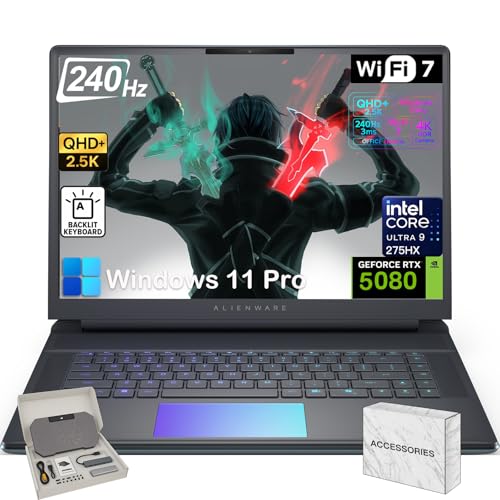
Similar Laptops You Might Like

$4032.00
10 reviews
Dell Alienware 18 Area-51 Gaming Laptop 18" 2.5K WQXGA Anti-Glare Display (Intel Ultra 9 275HX, GeForce RTX 5090, 64GB DDR5, 2TB PCIe SSD, Wi-Fi 7, Backlit KYB, Bluetooth 5.4, Windows 11 Home)
  • Brand: Dell
  • Model: AA18250
  • Screen: 18" Inches
  • Processor: Intel Ultra 9 275H
  • GPU:
  • RAM: 64 GB
  • Storage: 2 TB
Recent Reviews
april b (Verified Purchase)
5.0 out of 5 stars This is my second Alienware PC

Two words...LOVE IT!

Aaron (Verified Purchase)
5.0 out of 5 stars Impeccable

All hardware is top of the line. Arrived quickly and in perfect condition. Would give more than 5 stars if I could!

$3999.99
1 reviews
18 Area-51 Gaming Laptop - Intel 24-Core Ultra 9 275HX • NVIDIA GeForce RTX 5080 16GB GDDR7 • 18" WQXGA 300Hz 500 Nits Display • Backlit Keyboard • Windows 11 Pro • 32GB DDR5 + 1TB SSD
  • Brand: Alienware
  • Model: AA18250
  • Screen: 18 Inches Inches
  • Processor: Intel Ultra 9 275H
  • GPU: NVIDIA GeForce RTX 5080
  • RAM: 32 GB
  • Storage: 1 TB
Recent Reviews
jedmon (Verified Purchase)
5.0 out of 5 stars Huge, fast and reliable.

Awesome!